
Using Docling for Data Extraction and RAG Applications

If you’ve ever tried to build an AI agent, you’ve probably faced the challenge of having multiple sources of data and the difficulty of formatting these data in order to pass them to the agent.
This is what we can call a “data graveyard”: rich in information, but terribly difficult to process programmatically. Copying and pasting usually destroys the structure completely, resulting in a terrible input for the agents. So, what can we do?
In recent months, Docling, a library created by IBM Research and now hosted by Linux Foundation AI & Data, has surged in popularity, reaching nearly 38k stars on GitHub. Its description is simple: Get your documents ready for Gen AI, but its utility is powerful: an intelligent translator that takes the chaos of real-world documents and converts it into clean, structured, and most importantly, AI-ready data.
It allows you to transform almost any file into Markdown or JSON, perfect formats to be used as knowledge bases for AI agents.
The rise of technologies such as Retrieval Augmented Generation (RAG) has made this task more critical than ever. The quality of "Generation" in a RAG system depends directly on the quality of "Retrieval," which in turn depends on how well data is ingested and understood at the start.
In short: if you feed your system garbage, it will generate garbage.

This Article
This article is a casual, practical guide to understanding what Docling is and how you can use it to build smarter, more precise AI applications.
What is Docling and Why Should You Care?
Docling is a tool that simplifies document processing and prepares them for the Generative AI ecosystem. Its main features are:
- Multi-Format Support: Docling is like a Swiss Army knife. It handles a wide range of formats including PDF, DOCX, PPTX, XLSX, HTML, images (PNG, JPEG, TIFF), and even audio files like WAV and MP3.
- Advanced PDF Understanding: This is where Docling shines. Not only does it read text, it also understands the visual and logical structure of the page – such as correct reading order in multi-column documents, complex table structures, code blocks, math formulas, and image classification.
- Unified Data Format (DoclingDocument): Regardless of the input format, Docling converts everything to a unified, expressive internal representation called DoclingDocument. Think of it as a “universal language” for documents that preserves hierarchy and context.
- ↪Flexible Exporting: Once processed, documents can be exported into various formats such as Markdown, HTML, JSON (preserving full structure), or plain text.
- Plug-and-Play Integrations: Designed to work effortlessly with modern AI frameworks such as LangChain, LlamaIndex, and spaCy. Perfect for building RAG-based applications.
- Robust OCR: It has strong support for Optical Character Recognition, making it possible to process scanned documents or images without digital text.
The biggest advantage of Docling is its quality and contextual understanding, though it sacrifices some raw performance. Tools like PyMuPDF are faster but rarely match Docling’s semantic comprehension.
Another major highlight is that Docling runs completely locally, which means you can process sensitive data with confidence, knowing nothing is sent to the cloud – a must for developers working with confidential information.

Hands-On: Practical Guide to Master Docling
Enough theory, let’s jump into practice.
Installation
Run this command to install it:
pip install docling
Example 1: Your First Conversion in 60 Seconds (Python API & CLI)
Using the Python API
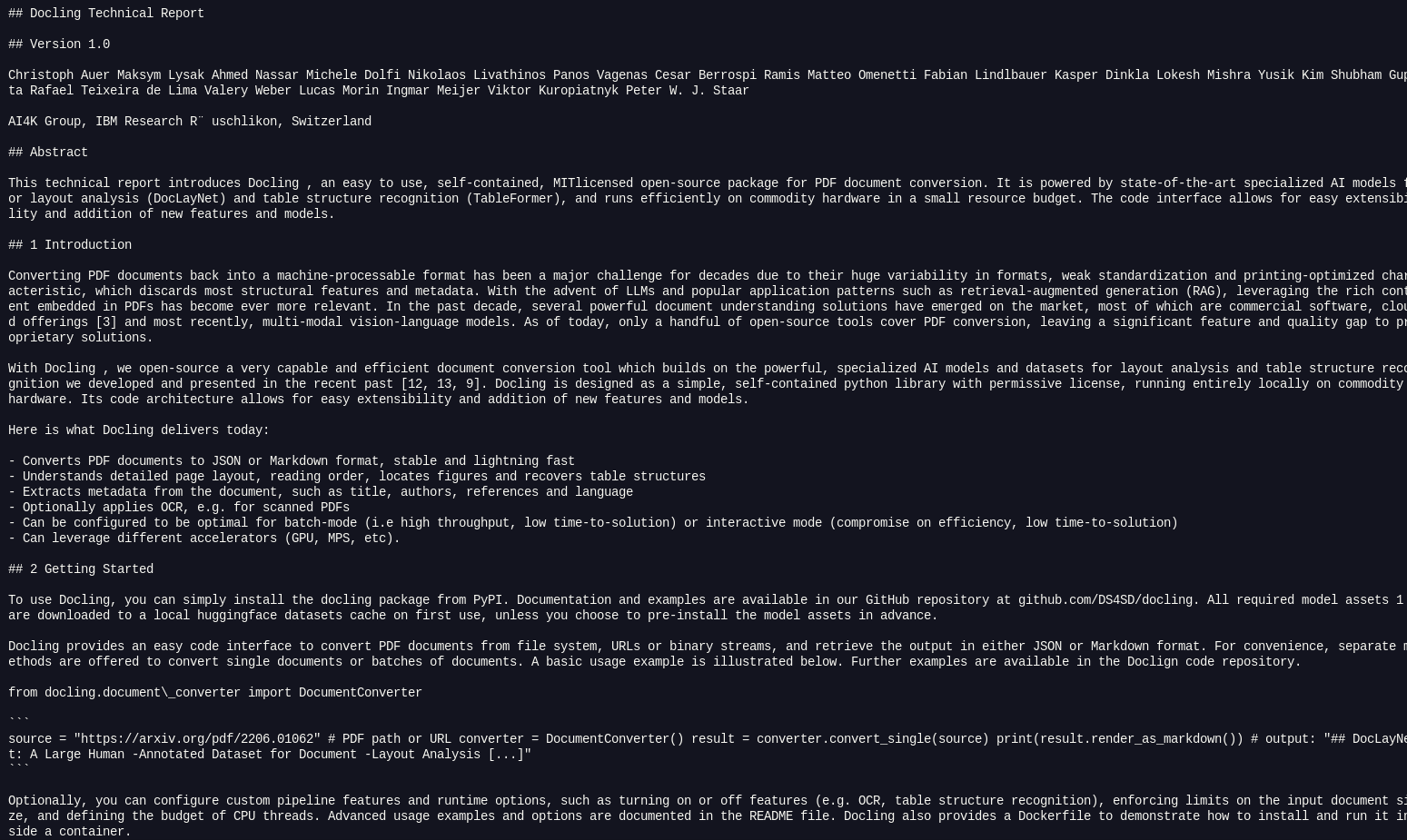
This is Docling’s “Hello World.” In just a few lines of code, we can download a scientific article from arXiv and convert it to Markdown.
from docling.document_converter import DocumentConverter

source = "https://arxiv.org/pdf/2408.09869"  # file path or URL
converter = DocumentConverter()
doc = converter.convert(source).document

print(doc.export_to_markdown())  # output: "### Docling Technical Report[...]"
Example 2: The End of “Copy & Paste” for Tables
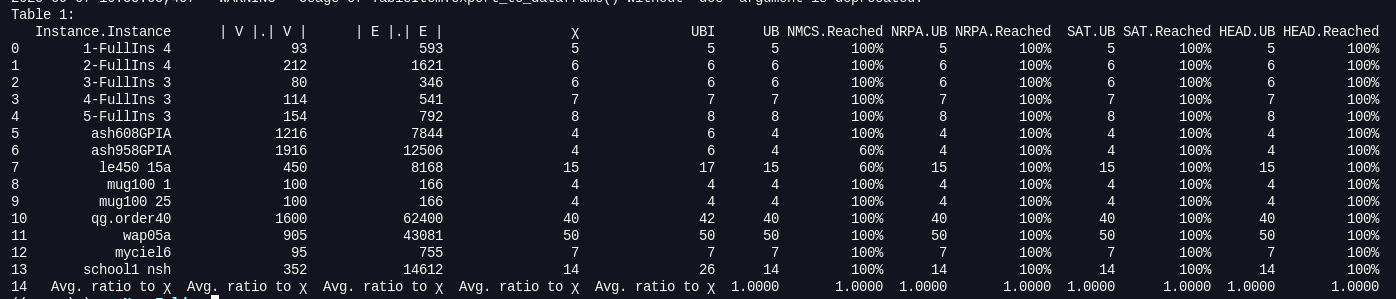
One of the most frustrating tasks in document processing is extracting data from tables. Docling makes this trivial, allowing direct export to a Pandas DataFrame, the standard data structure for analysis in Python.
from docling.document_converter import DocumentConverter

source = "https://arxiv.org/pdf/2504.03277"


converter = DocumentConverter()
result = converter.convert(source)

import pandas as pd


for idx, table in enumerate(result.document.tables):
    df = table.export_to_dataframe()
    print(f"Table {idx+1}:")
    print(df)
    break
This code not only extracts tables but also delivers them in a ready-to-analyze structured format, saving hours of manual work.
Beyond the Basics

Docling is more than a library, it’s a growing ecosystem designed to evolve with complex needs. Some of its advanced components include:
- Serving Docling as an API (docling-serve): For production environments, you might not want Docling running locally in each app. docling-serve allows packaging it as a RESTful service using FastAPI. Ideal for microservices, letting multiple applications consume its document processing capabilities.
- Docling as an Agent (docling-mcp): The Model Context Protocol (MCP) transforms Docling into a set of “tools” that an AI agent can invoke. Imagine an agent that, to answer a complex question, autonomously finds a relevant report on the web, uses Docling to extract its content, analyzes the data, and finally generates a new document with the answer.
Continue Your Journey with Docling
Here are some essential resources:
 docling-project
 docling-project

Member discussion